

Your marketing guide for Advanced Manufacturing Madrid starts here.
We know that preparing for a trade show can be challenging.
👉 That’s why we’ve created this quick guide to help you get started with completing your online profile, accessing your My Easyfairs account, and making the most of your EasyGo Marketing package.
If you have any questions regarding stand design, build-up regulations, or the positioning of exhibition materials, please refer to the Operations Manual.
Where would you like to start?
I’m new to the trade fair
Is this your first time exhibiting?
I’ve taken part before
Have you exhibited with us before?
Event Calendar
MAY
JUNE
••• 1 JUNE: OPENING OF REGISTRATION FOR VISITORS AND EXHIBITORS
••• 30 JUNE: CLOSING DATE FOR THE ADVANCED MANUFACTURING AWARDS AND LAST DAY TO REQUEST PRINTED INVITATIONS
Use am banners on your website
JULY
SEPTEMBER
OCTOBER
FAIR
• | SET-UP:
2 NOVEMBER: 15:00–20:00
3 NOVEMBER: 09:00–19:00
| EVENT (EXHIBITORS):
4 NOVEMBER: 09:00–19:30
5 NOVEMBER: 09:00–18:30
EVENT (VISITORS):
4 & 5 NOVEMBER: 09:30–18:00
• | BREAKDOWN:
5 NOVEMBER: CONCURRENTLY WITH ORGANISATION, 19:00–21:00
6 NOVEMBER: 09:00–15:00
• COMPLETE YOUR PROFILE IN MY EASYFAIRS.
• REQUEST PRINTED INVITATIONS.
• SUBMIT YOUR APPLICATION FOR THE 5TH EDITION OF THE AM AWARDS.
• 1 JUNE: opening of registration for visitors and exhibitors.
• 30 JUNE: closing date for the Advanced Manufacturing Awards.
• 30 JUNE: last day to request printed invitations.
• Don’t go on holiday without inviting your contacts.
• Leave your on-site stand prepared.
15 SEPTEMBER:
• Exhibitors’ meeting
• You will start receiving printed invitations at your offices.
• Sign up for the Lives! Demo Machinery
• 1 OCTOBER: last day to register for the LIVE DEMO MACHINERY.
• 4 OCTOBER: you will receive your new digital invitation with congress access included.
• 19 OCTOBER: last day to set up the SMART READERS.
SET-UP AND EVENT SCHEDULE
SET-UP:
2 November: 15:00 to 20:00
3 November: 09:00 to 19:00
EVENT (EXHIBITORS):
4 November: 09:00 to 19:30
5 November: 09:00 to 18:30
EVENT (VISITORS):
4 & 5 November: 09:30 to 18:00
BREAKDOWN:
5 November: 19:00 to 21:00, in parallel with the organising team
6 November: 09:00 to 15:00
My Easyfairs: Portal for exhibitors
The first thing you need to do is log in to My Easyfairs. My Easyfairs is a microsite where you can manage much of your participation.
Access your My Easyfairs account via this link > https://my.easyfairs.com/login
- If you participated in the previous edition, please use the same username (your email) and password. If you do not remember them, click on “Forgot my password”.
- If this is your first time participating in an Easyfairs event, you will need to activate your account. Follow these simple steps:
Once your participation is confirmed, we will send you an email to activate your My Easyfairs account. Simply click on ACTIVATE ACCOUNT. If you have not received it or cannot find it, please contact advancedmanufacturing@easyfairs.com and we will resend it to you.
Complete your first name, last name and choose a password.
You will receive an email to verify your account.
Once your account is created, you will be able to access your My Easyfairs via the event website.
You will always find the access link on our website (top right corner) or via this link. To log in, use your username (email) and the password you have just created.
You can check which EasyGo package you have via My Easyfairs.
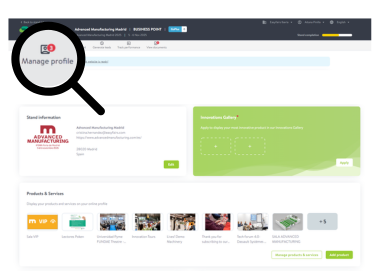
Complete your profile in My Easyfairs.
Complete your profile on MyEasyfairs and secure your visibility
Your MyEasyfairs profile will appear in our exhibitor catalogue and will be the first impression a potential lead has of your company.
- If you do not complete your profile, you will appear with no information
(i.e. no description, no products and no content). - You only need to complete:
- Company information (name, website, contact details…)
- Company description
- Logo and images
- Products
Reminder: You must complete the information in both Spanish and English for your profile to be validated.
Marketing tools
Invite your contacts and multiply your opportunities.
A large part of the success of your participation in the trade fair depends on something very important: increasing visibility of your presence and inviting your contacts.
The more clients and potential visitors know that you will be attending, the more visitors you will receive at your stand and the more business opportunities you will generate.
In addition, as you have an EasyGo package, it couldn’t be easier!
The earlier you start inviting, the better results you will achieve.
Banners
💡 Tip: always add your personalized link to track results.
Personalized invitation link
Your most important tool.
You can customize it in MyEasyfairs with:
Your logo, your own message
✅ It will allow you to see who registers and generate leads before the event.
My Easyfairs > Invite your contacts
Advanced Manufacturing badge – Social media
Invitation sending service (we do it for you)
👉 We take care of everything for you:
Upload your database in MyEasyfairs, we design the email, and we send the campaign on your behalf.
Digital invitations (to send yourself)
👉 We provide you with a ready-to-use email
Just copy it
Paste it into your tool (Salesforce, Outlook, etc.)
And send it to your database
The earlier you start inviting, the better results you will achieve.
Don’t wait until the last minute: exhibitors who engage their community in advance are the ones who generate the most leads.
Exhibitor staff registration
All staff on your stand must be registered as exhibitors in order to access the event app and generate leads.
It is not necessary to register for set-up or dismantling.
The exhibitor badge is the only pass that allows access to the hall on event days before visitors. Without this badge, access before 09:30 will not be permitted.
Instructions to register the staff attending during the event days:
Access your private MyEasyfairs area.
Click on MANAGE STAND and MANAGE YOUR STAFF IN VISIT CONNECT.
Click on TEAM (PERSONAL) in the application and add the required staff in ADD STAFF.
Turn visitors into your contacts (leads)
During the trade fair, you will have several ways to capture contacts and generate business opportunities.
The more interactions you have, the more leads you will generate, and the better you will be able to follow up after the event.
💡 You have two key tools: one works automatically and the other can be used actively.
Smart Badge Reader
⚙️ HOW IT WORKS:
When a visitor scans or taps their badge:
They are registered as a contact, they automatically receive information about your company, and their details are saved in your database, which we share with you after the event.
App Advanced Manufacturing
ADVANCED MANUFACTURING (official event app).
Your team uses it directly from their mobile devices to interact with visitors in real time.
⚙️ WHAT YOU CAN DO:
Scan badges, create custom forms, add notes for each contact, and qualify and classify your leads.
The ideal approach is to combine both:
Smart Reader → automatically generates volume
App → generates quality and qualification → all your stand staff registered as exhibitors have access to the APP
✅ This way, you maximise results during the trade fair.
Once the trade fair is over… how do you get your contact list?
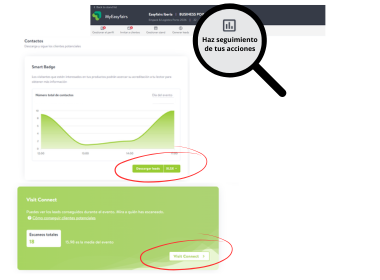
You will receive an email automatically, but don’t worry if you don’t receive it. You can access My Easyfairs directly and download it under the tab: Tracking your actions.
*You will have two separate databases: one generated with the Readers and another generated with the App.
Access and Parking
Address: IFEMA MADRID.
Halls: 1, 2, 4 and 6.